SPRACO3 October 2019 F28377D-SEP , INA240 , LMG5200 , TMS320F280021 , TMS320F280021-Q1 , TMS320F280023 , TMS320F280023-Q1 , TMS320F280023C , TMS320F280025 , TMS320F280025-Q1 , TMS320F280025C , TMS320F280025C-Q1 , TMS320F280040-Q1 , TMS320F280040C-Q1 , TMS320F280041 , TMS320F280041-Q1 , TMS320F280041C , TMS320F280041C-Q1 , TMS320F280045 , TMS320F280048-Q1 , TMS320F280048C-Q1 , TMS320F280049 , TMS320F280049-Q1 , TMS320F280049C , TMS320F280049C-Q1 , TMS320F28374D , TMS320F28374S , TMS320F28375D , TMS320F28375S , TMS320F28375S-Q1 , TMS320F28376D , TMS320F28376S , TMS320F28377D , TMS320F28377D-EP , TMS320F28377D-Q1 , TMS320F28377S , TMS320F28377S-Q1 , TMS320F28378D , TMS320F28378S , TMS320F28379D , TMS320F28379D-Q1 , TMS320F28379S
-
Dual-Axis Motor Control Using FCL and SFRA On a Single C2000 MCU
- Trademarks
- 1 Introduction
- 2 Benefits of the C2000 for High-Bandwidth Current Loop
- 3 Current Loops in Servo Drives
- 4 PWM Update Latency for Dual Motor
- 5 Outline of the Fast Current Loop Library
- 6 Evaluation Platform Setup
- 7 System Software Integration and Testing
- 8 Summary
- 9 References
7.6.3 SFRA GUIs
There are two GUIs available to perform the frequency response analysis: one (SFRA_GUI) to plot open loop and plant Bode diagram, and another (SFRA_GUI_MC) to plot open loop and closed loop Bode diagram. They can be invoked and connected to the target platform to study the control loops. The GUI executables are available in the location as mentioned in Section 7.6.1.
- Double click on the choice of GUI executable and the GUI screen will appear as shown in Figure 33 for SFRA_GUI or in Figure 34 for SFRA_GUI_MC. They look almost identical, the difference is in the pull down menu under 'FRA Settings' starting with the label 'Open Loop'.
- In the SFRA_GUI, this pull down menu helps to select between Open Loop Model and Plant Model.
- In the SFRA_GUI_MC, this pull down menu helps to select between Open Loop Model and Closed Loop Model.
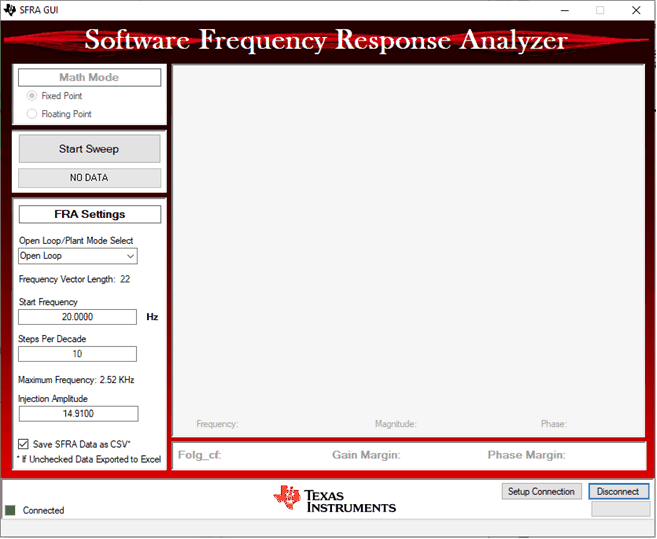 Figure 33. SFRA GUI
 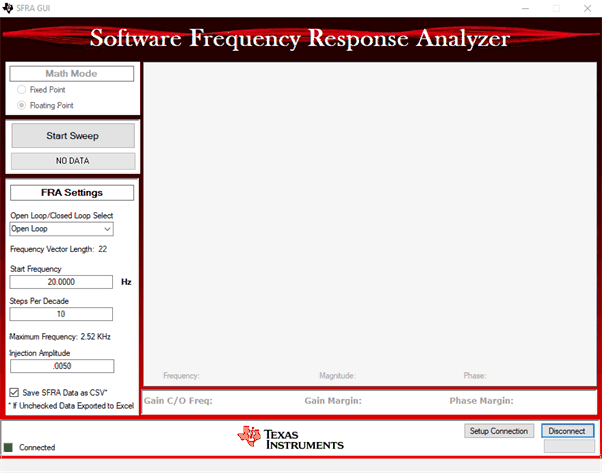 Figure 34. SFRA GUI MC
 This demo uses the GUI 'SFRA_GUI_MC'. However, it is encouraged to experiment with the SFRA_GUI as well to study the plant. With the SFRA_GUI, you can plot the same graph as in SFRA_GUI_MC by passing the argument 'SFRA_GUI_PLOT_GH_CL' in the function configureSFRA() as shown in the code snippet below:
configureSFRA(SFRA_GUI_PLOT_GH_H, M1_SAMPLING_FREQ);
But the inferences from the plots are not according to that in SFRA_GUI_MC. Therefore, it is advised to configure SFRA for 'SFRA_GUI_PLOT_GH_H' so that you can see open loop, closed loop and plant model plots using these two GUIs, by using one at a time.